
Learn how to calibrate your DuraLabel Bronco Max Industrial Label Printer. This video walks you through loading your supply, adjusting the tape guides, calibrating with the feed roller button, and getting your Bronco Max ready to print.
Calibrating your printer is the key to printing a perfect label every time, helping the printer accurately detect label size, gaps, and black marks for proper alignment and consistent printing. Calibration is typically needed when switching from continuous supply to die-cut or black mark labels.
1. Open the lid on your printer.
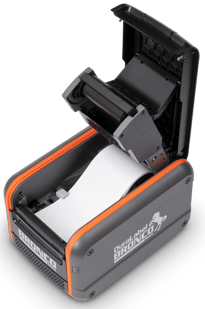
2. Press the Feed button as identified in the below image.
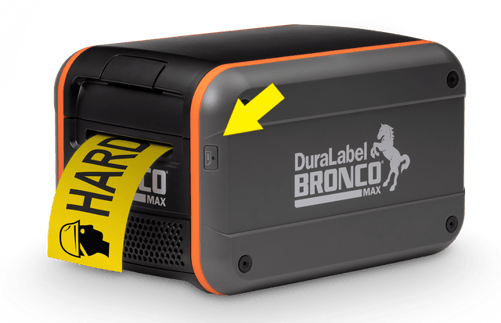
3. With the button still pressed, close the lid on the printer.
4. Once the printer starts feeding supply out of the cutter, release the button.
- Expect 1-2 labels to be ejected from the machine.
You should be calibrated and ready to print.
Please reach out to us with any further comments or questions at:
DuraLabel Support Number: +1 (888) 788-5572
DuraLabel Support: https://duralabel.com/support/
DuraLabel YouTube: https://www.youtube.com/@DuraLabelbyGP
DuraLabel Printers & Supplies: https://duralabel.com/printers-and-supplies/