
Standalone Toro Max
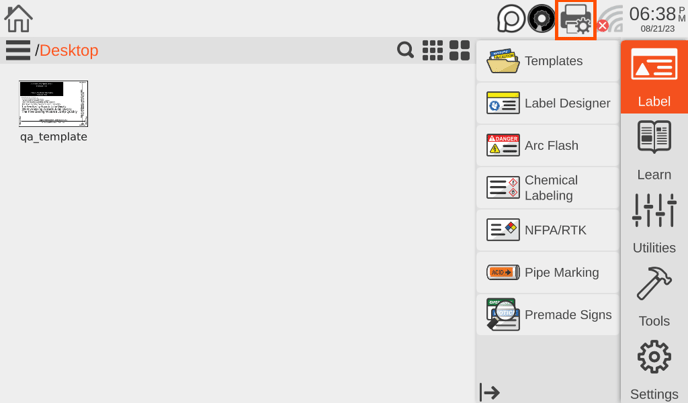
- From the home screen of the Toro Max click or tap on the printer icon in the top right-hand corner of the display.
- A new window will appear opening to the Printer Setup page. On this page towards the bottom of the page there is a Heat Intensity Offset slider.
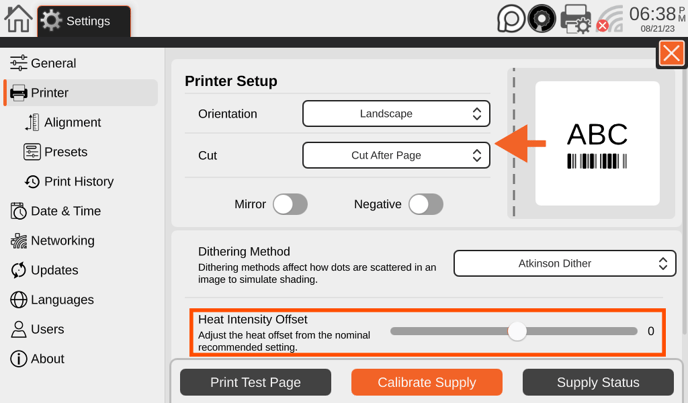
- Adjust the slider to the desired positon, by default this will begin at 0, but can be adjusted positively or negatively depending on the needs. Once done, close out of the page by clicking on the orange x and the adjustments will be saved.
From PC
- If printing from the PC make sure that the drivers have already been installed, if not please follow this guide that also includes a link to download the most up to date version of the drivers.
- After confirming that the drivers have been installed, navigate to the Printing Prefences by clicking the start icon and typing Control Panel. Then select the devices and printers option and within the new window that shows the drivers right-click on the Toro Max driver and select Printing Preferences.
- In the new window that appears, make sure that the current tab selected along the top is Layout and then click the Advanced... button.
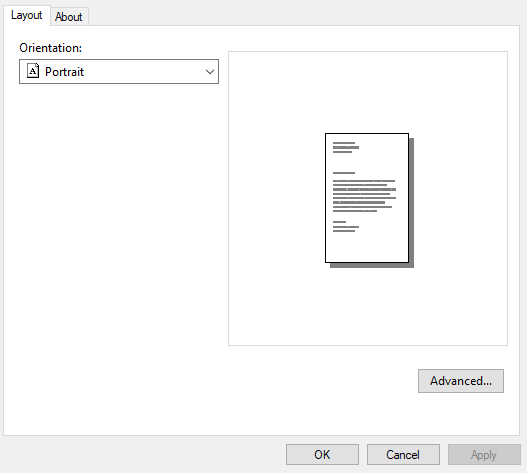
- Another window will appear, look for the Color Heat Intensity Offset and adjust the value positively or negatively depending on the needs.
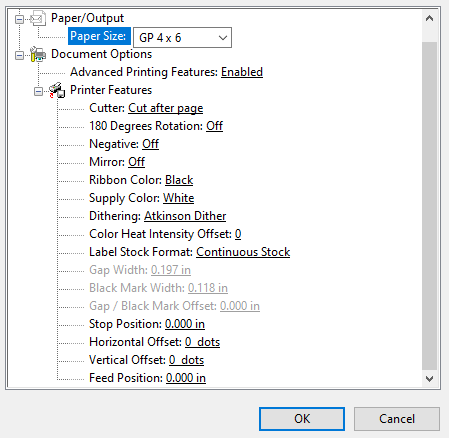
- Once completed click OK, then Apply, and OK to save the settings.
- If any software was open to print labels from that will need to be closed and reopened for the changes to take effect.
More Support Options
If you have any questions about using your DuraLabel Toro Max printer, get help from our world-class DuraLabel support team by calling 800-788-5572 or visiting DuraLabel.com. We're here to help with all your labeling needs!